
Read-only by design
Understand every tenant.
Plan every move.
Monitor onboarding, workload coverage, evidence gaps, certificate health and active discovery across every approved source tenant.
Evidence firstTenant, run and workload lineage
Least privilegeMetadata-only collection boundary
Durable by defaultCheckpointed and retry-safe execution
HomeSystem dashboard
Live data
Fleet operations
Discovery operations dashboard
Live persisted state for tenant progress, coverage, issues, certificates and runtime health.
Read-only collectionEvidence lineagePermission-aware coverage
Programme completion
0%
Not refreshed
Fleet status
Tenant status
Current evidence
Workload coverage
Risk and trust
Top issues & certificate health
Prioritised action
Tenants requiring attention
| Tenant | Status | Progress | Last run | Coverage gap / issue | Certificate expiry | Action |
|---|
No tenants in the selected scope currently require attention.
Platform
Runtime health
Audit trail
Recent discovery activity
Guardrailed assistance
AI recommendations
Optional AI status is loading.
Tenant evidence
Discovery data explorer
Browse the actual metadata collected for a tenant, inspect run lineage and download the retained source evidence.
Choose a tenant to load its persisted discovery evidence.
Estate intelligence
Tenant estate snapshot
A source-backed view of users, storage, collaboration and managed devices captured in the selected discovery run. Select any measure to inspect its source.
Evidence actions
People
Identity composition
Capacity
Known storage footprint
Only workloads with collected size evidence are included.
Collaboration
Connected workspace
Confidence
Collection coverage
Interactive topology
Tenant relationship map
Drag objects and the connected estate follows with a spring layout. Select any object to highlight and inspect every retained connection.
No relationship records were available in this run.
Migration intelligence
Discovered tenant inventory
Open the actual users, accounts, mailboxes, storage and collaboration records collected for this run.
Collection gaps
What needs permission, approval or manual evidence
Collected evidence
Files and reports
| Evidence | Type | Size | Updated | Actions |
|---|
No retained evidence matches this filter.
Record browser
Select an evidence file
Preview JSON, JSONL, CSV, logs and generated reports as inert data. Raw files remain available through authenticated download.
Select Preview beside a collected evidence file.
Evidence-grounded decision support
Intelligence Insights
Interpret one authorised discovery run with bounded evidence, explicit citations and a single cost-controlled provider request. DCC facts remain separate from AI recommendations.
Loading Intelligence configuration.
Validated result
No Insight generated
Only complete, schema-valid and evidence-validated results appear here.
Preparing bounded evidenceNo factual output is shown until validation completes.
Select an assessment or ask a question to create an evidence-grounded result.
Personal workspace
Saved Insights
No saved Insights loaded.
Decision-ready output
Report builder
Turn one persisted discovery run into a focused stakeholder report. Choose the audience, include only the evidence you need, preview it, then download it.
1
Source
Choose discovery evidence
2
Audience
Choose a report style
3
Content
Select report sections
Output
Generate your report
Choose a tenant to load available evidence.
Discovery execution
Run approved discovery
Choose one approved tenant, confirm the metadata-only workload scope and monitor durable execution.
- 01Tenant
- 02Scope
- 03Review
- 04Evidence
01 / Source
Choose a tenant
02 / Scope
Configure discovery
Every selected workload produces a result. Unsupported or unapproved Microsoft interfaces are recorded as explicit gaps, never as false successes.
04 / Evidence
Current run
A submitted run will appear here with its live tenant state and evidence location.
Tenant lifecycle
Onboard or offboard a tenant
Generate the exact package to send, follow the source-admin hand-back, and finish with deterministic trust checks. Offboarding is kept beside onboarding so the full lifecycle is in one place.
1
Central platform operator
Create the source-admin package
Enter the verified source-tenant details. The portal creates one tenant-specific certificate trust and downloads a public-only ZIP.
Send this one file to the source admin
M365-Discovery-Onboarding-<tenant>.zipDo not send a PFX, private key, client secret or token.2
Source-tenant administrator
Run the included bootstrap
ExtractThe ZIP on a controlled workstation
OpenPowerShell 7.2 or later
Run
.\Invoke-M365DiscoveryBootstrap.ps1Return only
onboarding-result.json3Waiting for result
Central platform operator
Upload the returned proof and register
Do not upload a PFX, private key, client secret or token. Only the public onboarding ZIP and returned JSON proof belong in this workflow.
The portal validates package integrity, tenant/app binding and the read-only permission boundary before registration.
Recoverable hand-off
Previously issued packages
1
Central platform operator
Download the offboarding package
Select the tenant and download the exact ZIP to send to its authorised administrator.
2
Source-tenant administrator
Remove the source trust
ExtractThe downloaded ZIP
Run
.\Remove-M365DiscoveryTenant.ps1ConfirmGraph and Exchange sign-ins
Return only
offboarding-result.json3
Verified closure
Disable the tenant in DCC
The source application must be proven deleted before the platform certificate and tenant are disabled.
Select a tenant first.
End-to-end operations
Platform health & architecture
Runtime probes and Azure Resource Manager inventory for the complete deployed solution. An unavailable management-plane check is shown as unavailable, never as healthy.
Runtime
Dependency health
Azure estate
Deployed resources
| Resource | Type | Region | Status | State |
|---|
Solution blueprint
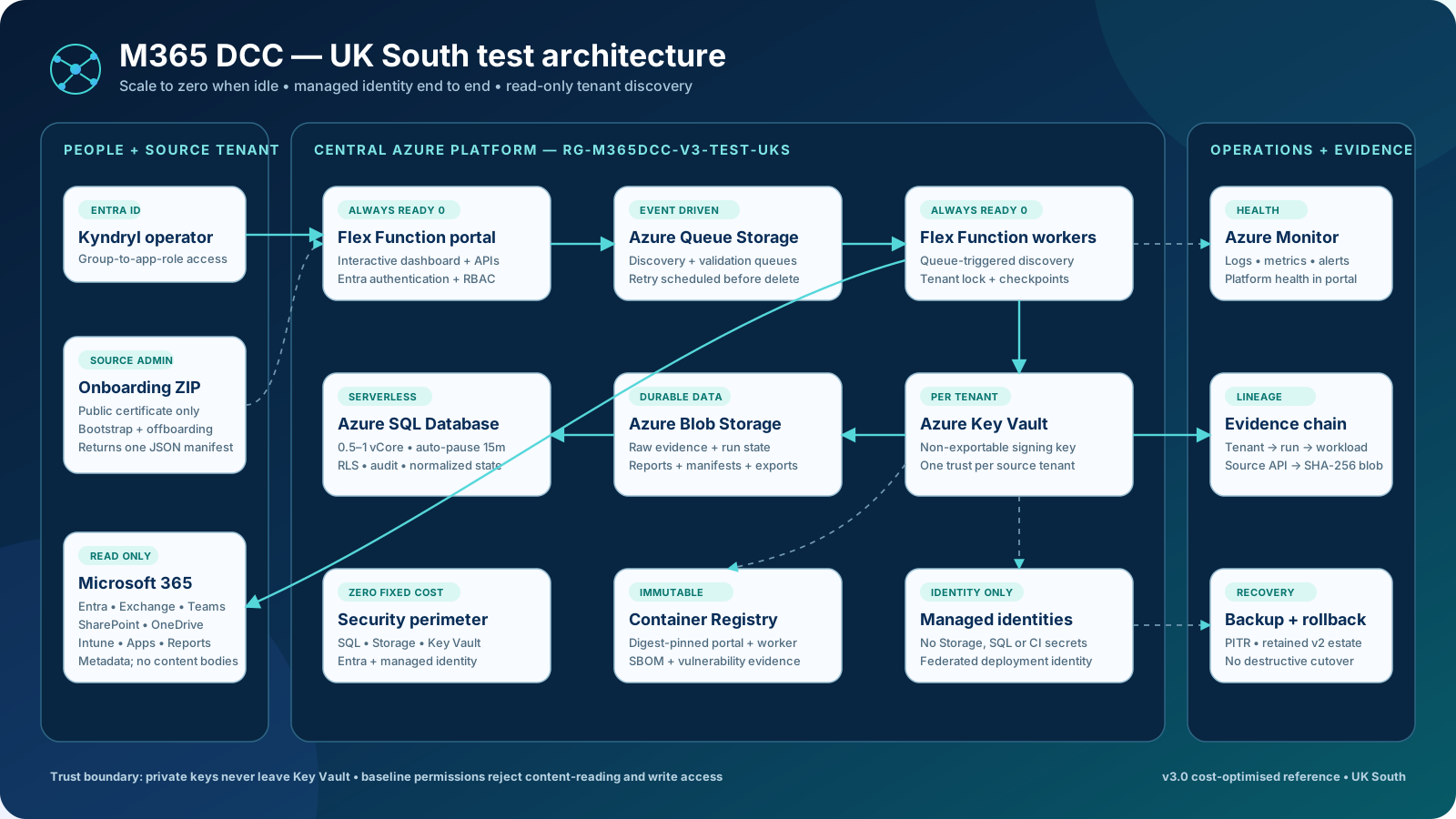
Full M365 DCC architecture
Authentication, managed identities, private data services, queues, jobs, monitoring and source-tenant trust.
Platform governance
Policy & settings
Control discovery defaults and the provider, security and spend boundaries for optional Intelligence. Every saved change is recorded in the append-only audit trail.
Administrator only
AI Intelligence
Provider credentials stay in Key Vault. SQL stores only the secret reference, bounded limits and optional administrator-maintained cost rates.
Operational evidence
Tenant discovery history
Inspect each persisted discovery job, its exact workload outcomes, retained warnings and sanitized errors, retries, correlation lineage and the append-only control-plane log.
Not loaded
Selected job
Choose a discovery job
Select a retained job to inspect its execution evidence.
Collectors
What worked and what did not
Lineage
Job event timeline
System log
Platform and control-plane activity
Latest append-only portal and worker events. Error text is the sanitized diagnostic retained by the platform.
TimeLevelComponent / eventTenant / runDetail